
Your team needs to publish more content, but your writers can’t keep up with the calendar, and hiring more freelancers eats into a budget that should go toward your mission. That’s the exact problem ai powered content creation platforms solve, and why so many nonprofits and mission-driven organizations we work with have added one to their marketing stack this year.
This isn’t another vague roundup of AI hype. We tested and compared ai content creation tools based on what actually matters for organizations juggling donor communications, social posts, grant content, and campaign copy on tight staff and tighter budgets. You’ll see which tools handle long-form writing well, which excel at visuals or social captions, and which integrate cleanly with a CRM like HubSpot for donor-focused campaigns.
Below, we break down 9 platforms worth your attention in 2026, covering pricing, strengths, and real limitations. Whether you’re searching for the best ai content generator for blog posts or an ai platform for content creation that spans multiple formats, you’ll walk away knowing exactly which tool fits your organization’s workflow and goals.
1. HubSpot AI content tools
How it works
HubSpot built its AI content tools directly into the same CRM where your donor and contact data already lives, which is the whole point. Content Assistant and the newer Breeze AI features let you generate blog drafts, emails, landing page copy, and social captions from a simple prompt, then pull personalization tokens straight from contact records. So a fundraising email can reference a donor’s last gift amount or event attendance without you manually merging fields. Because the AI sits inside Marketing Hub, it also suggests content based on what’s already converting in your funnel, not generic web trends.
The real value isn’t the writing itself, it’s that the AI already knows your donor data.
Who it’s for
Organizations already running HubSpot CRM, or planning to, get the most out of this. If your team manages donor segments, membership renewals, or multi-channel campaigns and wants one system instead of five disconnected apps, this is the natural fit. Smaller nonprofits without a CRM yet should weigh the switching cost before jumping in purely for the AI features.
Key features
- Content Assistant: drafts blog posts, emails, and ad copy from a short brief
- Breeze Social Agent: generates and schedules social posts across platforms
- SEO recommendations: built into the blog editor, flagging keyword gaps as you write
- CRM-linked personalization: inserts real contact and deal data into generated copy
- Content remix: turns one blog post into email, social, and landing page variants
Pricing
HubSpot doesn’t sell AI as a standalone add-on for most tools; it’s bundled into Marketing Hub tiers, which start around $20/month for Starter and scale into the thousands for Enterprise, depending on contact volume and seats. Nonprofits often qualify for discounted pricing through HubSpot’s own nonprofit program, which is worth confirming directly with HubSpot or a certified partner before you budget. Check HubSpot’s official pricing page for current tiers, since they shift with feature bundling changes throughout the year, as documented on HubSpot’s pricing site.
Worth noting: teams that already lean on HubSpot for donor pipelines tend to see the fastest return here, since there’s no new integration to build.
2. Jasper
How it works
Jasper works as a dedicated AI content creation platform built for marketing teams that need brand-consistent copy at scale. You feed it brand voice guidelines, past content samples, and campaign goals, and it generates blog posts, ad copy, and email sequences that actually sound like your organization wrote them. Jasper’s Brand Voice feature analyzes your existing content and locks that tone into every output, so a grant proposal and a social caption don’t read like two different writers.
Jasper earns its price tag when brand consistency matters more than raw speed.
Who it’s for
Marketing teams juggling multiple campaigns across channels benefit most here, especially organizations with strict messaging guidelines around donor trust and mission language. Solo marketers at small nonprofits may find Jasper’s learning curve and price steeper than what a simpler ai content creation tool would justify.
Key features
- Brand Voice: trains the AI on your existing content to match tone consistently
- Campaigns: builds multi-asset content sets from one brief, including emails and social posts
- SEO mode: integrates with Surfer SEO for optimized long-form drafts
- Templates: over 50 pre-built frameworks for common formats like donor appeals and newsletters
- Team collaboration: shared workspaces with approval workflows for larger staff
Pricing
Jasper’s Creator plan starts around $49/month per seat, with Pro and Business tiers scaling up for teams needing more brand voices, seats, or API access. There’s no permanent free tier, though Jasper occasionally runs trial periods, so confirm current terms directly with Jasper before committing budget. Nonprofits without dedicated marketing staff often find the cost hard to justify against simpler tools.
3. Surfer SEO
How it works
Surfer SEO takes a different angle than the other tools on this list: it’s not primarily a writer, it’s an optimization engine that tells you what to write. You plug in a target keyword, and Surfer analyzes the top-ranking pages, then hands you a content score based on word count, headings, keyword density, and related terms competitors are using. Its AI writing add-on can draft sections directly inside that same editor, so you’re generating copy and hitting SEO benchmarks in one pass instead of writing first and optimizing later.
Surfer doesn’t just help you write content, it tells you exactly what Google expects to see.
Who it’s for
This ai content creation tool fits organizations that already publish blog content but aren’t seeing it rank, particularly nonprofits competing for search traffic against better-funded sites. Content managers who care more about organic visibility than pure drafting speed will get the most value. Teams that just need fast social captions or emails should look elsewhere, since Surfer’s whole design centers on long-form SEO content.
Key features
- Content Score: real-time grading against top-ranking competitor pages
- SERP Analyzer: breaks down what’s working for pages already ranking for your keyword
- AI Outline and draft generator: builds a structure and first draft based on the same data
- Audit tool: scans existing published pages and flags what to update for better rankings
- Google Docs and WordPress integration: keeps the workflow inside tools your team already uses
Pricing
Surfer’s Essential plan starts around $89/month, with Scale and Enterprise tiers adding more content audits, seats, and AI generation credits. There’s no free plan, but Surfer offers a trial period worth testing against a page you’re already trying to rank. Budget-conscious teams should weigh this against simpler, cheaper ai powered content creation tools if SEO isn’t the immediate priority.
4. Copy.ai
How it works
Copy.ai leans into speed over depth, positioning itself as an ai content creation tool for teams that need short-form copy fast: social captions, ad variations, email subject lines, and product descriptions. You describe what you need in plain language, and Copy.ai’s Workflows feature chains multiple prompts together, so a single campaign brief can output a full set of social posts, an email, and ad copy variants in one run instead of separate requests.
Copy.ai wins on volume and speed, not on nuanced long-form writing.
Who it’s for
Small marketing teams and one-person shops handling social media for a nonprofit fit Copy.ai well, especially when the need is quick turnaround on campaign variations rather than polished long-form articles. Organizations running frequent donor appeals across multiple channels can use Workflows to cut repetitive drafting time. Teams needing deep research or SEO-optimized blog content should pair this with a tool built for that instead.
Key features
- Workflows: chains prompts to generate multiple content types from one brief
- Chat mode: conversational interface for quick edits and brainstorming
- 90+ templates: covers ads, captions, product descriptions, and email formats
- Brand voice settings: keeps tone consistent across generated variants
- Team workspace: shared projects and content history for collaborative editing
Pricing
Copy.ai offers a free plan with limited monthly credits, useful for testing before committing budget. The Pro plan runs around $49/month for a single seat, with Team and Growth tiers scaling for larger staff and higher word limits. Nonprofits testing whether ai powered tools for content creation fit their workflow at all often start here before upgrading to a dedicated writing platform like Jasper.
5. Canva AI
How it works
Canva built its AI features, branded Magic Studio, right into the design canvas most nonprofit teams already use for social graphics and flyers. Type a prompt into Magic Design and it generates a full layout, complete with images, text, and color palette, based on your brief. Magic Write handles on-canvas copy for captions or headlines, while Magic Media generates images or short video clips so you’re not hunting for stock photos that don’t fit your mission’s visual identity.

Canva AI treats visuals as the starting point, with text generation as a supporting feature, not the other way around.
Who it’s for
This ai content creation app fits teams without a dedicated designer, which describes most nonprofit marketing departments. If your bottleneck is turning a fundraising appeal into an Instagram graphic or event flyer fast, Canva AI closes that gap better than any text-first tool on this list. Teams needing polished long-form articles or SEO-driven blog content should treat Canva as a visual companion, not a replacement for a writing platform.
Key features
- Magic Design: generates full layouts from a text prompt or uploaded photo
- Magic Write: drafts on-canvas copy for captions, headlines, and short text blocks
- Magic Media: creates images and short video clips from text prompts
- Background Remover and Magic Eraser: cleans up photos without a design background
- Brand Kit: locks fonts, colors, and logos across every AI-generated design
Pricing
Canva’s free plan covers basic Magic Studio features, which many small nonprofits never outgrow. Canva Pro runs about $15/month per user and unlocks higher AI generation limits, plus Canva offers a verified nonprofit discount worth applying for directly through Canva for Nonprofits.
6. Descript
How it works
Descript flips traditional video editing on its head by treating your footage like a text document. Upload a video or audio recording, and Descript transcribes it automatically, then lets you cut, rearrange, or delete content by editing the transcript itself instead of scrubbing a timeline. Its AI content creation tool set goes further with Overdub, which clones your voice to fix flubbed lines without a re-record, and Studio Sound, which strips background noise from donor testimonials recorded on a phone in a noisy hallway.

Editing a transcript to cut a video is faster than any timeline editor you’ve used before.
Who it’s for
Nonprofits producing donor testimonials, event recap videos, or podcast content will get real mileage here, especially teams without a dedicated video editor on staff. Communications staff who already write scripts can repurpose that same text to drive the edit, cutting hours off post-production. Teams that only need static graphics or written blog content don’t need Descript at all; it’s built specifically for audio and video work.
Key features
- Transcript-based editing: cut video by deleting text, no timeline scrubbing required
- Overdub: clones your voice to fix mistakes without re-recording
- Studio Sound: removes background noise from raw audio automatically
- AI Actions: summarizes, chapters, or repurposes long recordings into shorter clips
- Underlord: auto-generates rough cuts and highlight reels from longer footage
Pricing
Descript offers a free plan with limited transcription minutes and watermarked exports, useful for testing before committing budget. The Creator plan runs around $24/month per seat, while Business tiers scale up for teams needing more transcription hours, seats, and Overdub voice cloning access. Confirm current limits directly with Descript, since free-tier minutes tend to shift as features get added.
7. Synthesia
How it works
Synthesia turns a text script into a talking-head video using AI avatars, so you skip the camera, lighting, and editing bay entirely. Type your donor update or training script into the editor, pick from over 140 stock avatars or clone one of your own staff members with their consent, and Synthesia generates a full video with lip-synced speech in minutes. This ai driven content creation approach works in more than 120 languages, which matters if your organization runs multilingual outreach or international programs and doesn’t have budget for separate voiceover talent per language.

A script becomes a finished video without ever touching a camera.
Who it’s for
Nonprofits producing recurring video content, like monthly donor updates, volunteer training, or program explainer videos, get the most value here. Organizations without in-house video production but with a steady need for talking-head content can skip hiring a videographer altogether. Teams needing authentic footage of real events, beneficiaries, or donor testimonials should stick with real recordings, since avatars still read as clearly synthetic on close inspection.
Key features
- Custom avatars: clone a real staff member’s likeness and voice for on-brand videos
- 140+ languages: generates lip-synced speech without hiring voiceover talent
- Screen recorder: combines avatar narration with screen capture for training content
- Templates: pre-built layouts for explainer videos, updates, and onboarding
- Brand kit: locks logos, colors, and fonts across every generated video
Pricing
Synthesia’s Starter plan runs around $29/month for limited video minutes, while Creator and Enterprise tiers scale up for custom avatars, more minutes, and API access. There’s no permanent free tier beyond a short trial, so test it against one real script before committing budget.
8. ChatGPT
How it works
ChatGPT works as a general-purpose AI content creation tool that handles almost anything you type into it, from a first draft of a grant proposal to a brainstorm of subject lines for a year-end appeal. You describe what you need in plain conversation, and it responds, then you refine through follow-up prompts until the output matches your tone. Custom GPTs let you build a version trained on your organization’s style guide and past newsletters, so repeat prompts don’t require re-explaining your voice every time.
ChatGPT is the closest thing to a flexible writing partner that never clocks out.
Who it’s for
Small teams and solo marketers who need one tool for many jobs fit ChatGPT well, especially organizations without budget for three or four specialized platforms. Staff comfortable writing detailed prompts get far better output than those expecting polished copy on the first try. Teams needing built-in SEO scoring, CRM data, or design tools should pair ChatGPT with something purpose-built, since it doesn’t natively integrate with donor records or publishing platforms.
Key features
- Custom GPTs: trains a version on your brand voice and past content
- Canvas mode: edits long-form drafts side by side with inline suggestions
- Web browsing: pulls current data and citations into research-heavy content
- Image generation: creates visuals directly inside the same conversation
- Memory: retains context across sessions so you’re not repeating instructions
Pricing
ChatGPT’s free tier covers basic use with usage limits during peak hours. Plus runs $20/month per user, and Team and Enterprise tiers add higher limits plus admin controls, per OpenAI’s pricing page.
9. Grammarly
How it works
Grammarly works quietly in the background of whatever you’re already writing, whether that’s a HubSpot email, a Google Doc grant proposal, or a LinkedIn post for donor outreach. Its AI content creation tool set has grown well beyond grammar checks: GrammarlyGO now rewrites full paragraphs, adjusts tone, and drafts replies from a short prompt, all inside the same browser extension or desktop app you’re already using. Type a rough donor thank-you note and ask it to sound warmer, and it rewrites the whole thing in seconds without you leaving the document.
Grammarly catches the errors that make donors question your credibility before they finish reading the first sentence.
Who it’s for
Every nonprofit communications team benefits here, regardless of what other ai powered content creation platforms they run. It’s less a primary writing tool and more a safety net that catches typos, tone mismatches, and clarity issues before a donor email or press release goes out. Teams publishing under tight deadlines with no dedicated proofreader get the most value, since Grammarly catches what a rushed second read misses.
Key features
- Tone detector: flags when copy reads too casual or too stiff for the audience
- GrammarlyGO: rewrites, shortens, or expands text from a simple prompt
- Plagiarism checker: scans drafts against billions of web pages before publishing
- Style guide: enforces consistent brand terminology across a whole team
- Browser and app integration: works inside Gmail, Google Docs, and most CRMs
Pricing
Grammarly’s free plan covers basic grammar and spelling checks, which many small teams never outgrow. Grammarly Business runs about $15/month per seat for teams needing style guides, tone control, and admin oversight, with nonprofit pricing worth requesting directly.
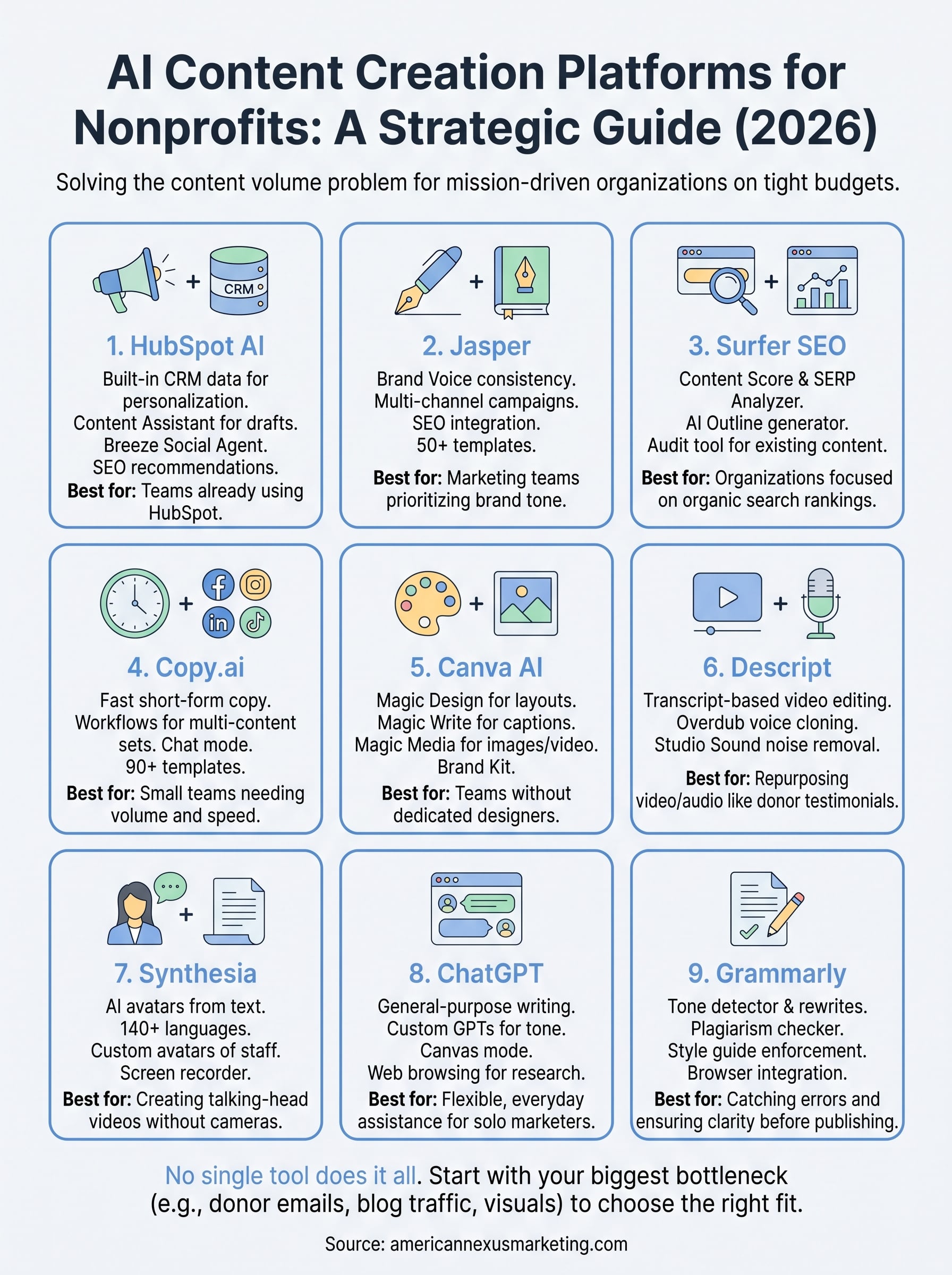
Which platform actually fits your team?
No single ai powered content creation platform does everything, and that’s the real takeaway here. HubSpot makes sense when your donor data and content need to live in one place. Jasper and Copy.ai handle brand-consistent writing at different speeds and price points. Surfer earns its keep when rankings matter more than raw output. Canva, Descript, and Synthesia cover the visual and video work text tools can’t touch, while ChatGPT and Grammarly round things out as flexible, everyday assistants.
Start by naming your actual bottleneck: donor emails, blog traffic, social graphics, or video. Pick one tool that solves that problem well before stacking on a second. Most nonprofits we work with end up running two or three of these together, not nine.
If you’re still not sure which combination fits your team’s budget and donor workflow, talk to Nexus Marketing about building a stack that actually works for your mission.