
Keep It Consistent: How to Audit Your Business NAP for Better Rankings
What Is a NAP Consistency Audit (and Why It Matters for Local SEO)
A NAP consistency audit is the process of checking that your business Name, Address, and Phone number are identical across every online directory, listing, and platform where your business appears.
Here’s a quick breakdown of what that means in practice:
- NAP = Name, Address, Phone number
- NAP+W = Name, Address, Phone number + Website URL
- Consistent = the same spelling, formatting, and punctuation everywhere, without exception
- Audit = systematically checking every place your business is listed and flagging anything that doesn’t match
If your Google Business Profile says “123 Main Street, Suite 4” but Yelp says “123 Main St #4” — that counts as an inconsistency. Even small differences like that send confusing signals to search engines.
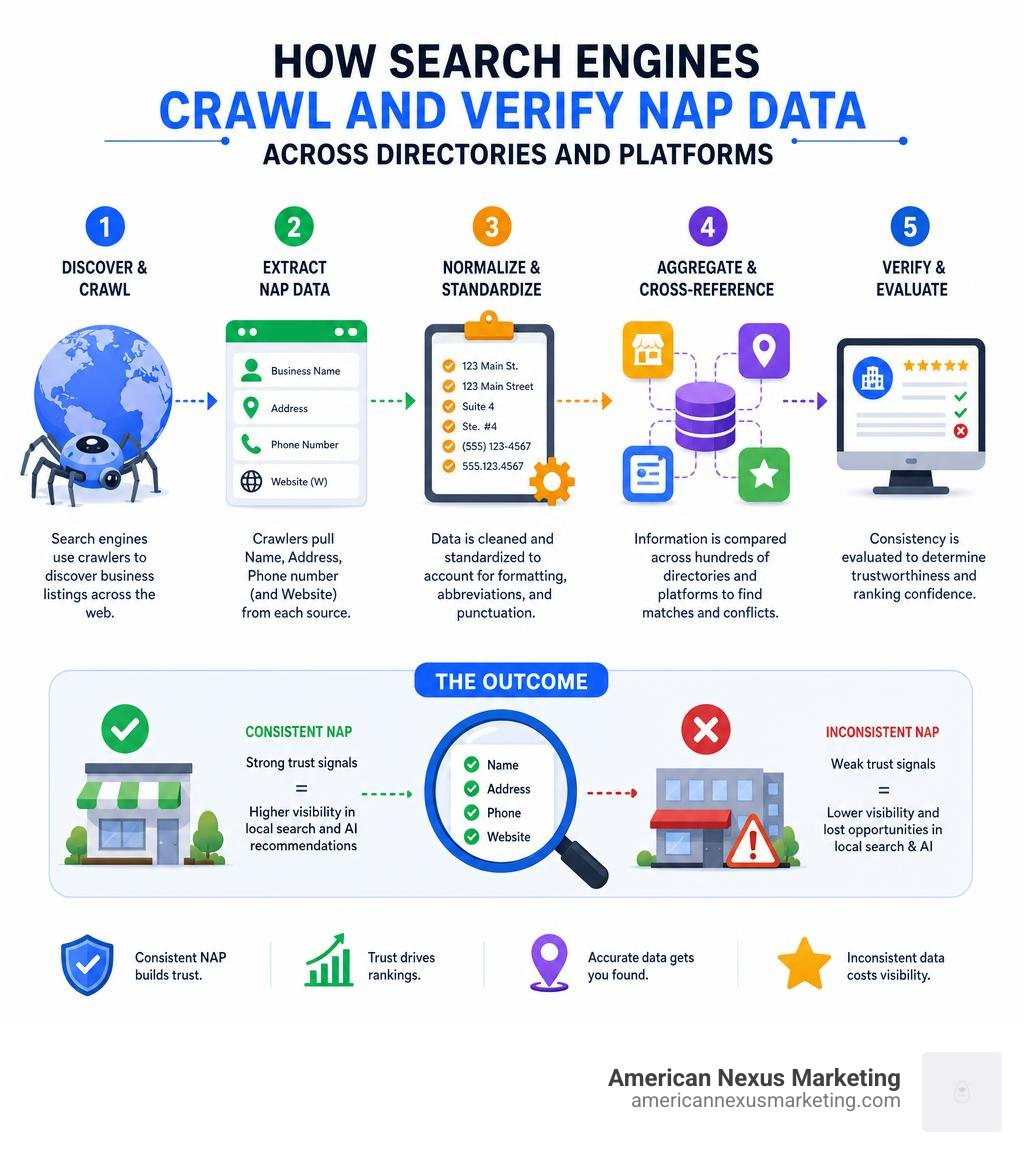
Why does this matter? Google cross-references your business details across hundreds of directories to decide whether your business is legitimate and trustworthy. Inconsistent data creates doubt. That doubt can quietly push you lower in local search results — including the Google Local 3-Pack — without any obvious warning sign.
Here’s the part that surprises most people: after analyzing 3,500 websites, researchers found that only one single business scored a perfect NAP consistency rating. Less than 1% of businesses are getting this right. That means fixing your NAP is one of the fastest ways to stand out in local search — because almost no one else has done it.
And it’s not just Google anymore. AI tools like ChatGPT and Microsoft Copilot now pull local business recommendations from sources like Bing Places. Inconsistent NAP data is a direct trust signal problem for these AI systems too.
The Critical Role of NAP in Local SEO and AI Search
To understand why a NAP consistency audit is so vital, we need to look at how search engines and modern AI systems evaluate local businesses.
When a user types “plumber near me” or asks an AI assistant for “the best bakery in town,” search engines must instantly query their indexes to find the most relevant, closest, and most prominent options. According to industry studies, citation signals (which include your NAP consistency) account for approximately 13% of the local pack ranking algorithm.
Google’s local ranking factors rely on three primary pillars:
- Relevance: How well a local business profile matches what someone is searching for.
- Distance: How far each potential search result is from the location term used in a search.
- Prominence: How well-known a business is, heavily based on information Google gathers from across the web (links, articles, directories, and reviews).
If your NAP data is fractured across the web, Google’s algorithm cannot confidently determine your prominence. It might treat “Acme Plumbing LLC” on one directory and “Acme Plumbing & Heating” on another as two entirely separate entities, diluting your ranking power.
Furthermore, we are firmly in the era of AI search. Large Language Models (LLMs) like ChatGPT and Microsoft Copilot do not just look at your website; they scan the entire digital landscape to establish a “trust score” for your brand. If an AI system detects different phone numbers or old addresses across legacy directories, it flags your business as potentially inactive or unreliable. This results in a direct penalty to your AI visibility, meaning the AI will simply recommend a competitor with cleaner data.
Why Your Business Needs a NAP Consistency Audit
An audit is not just about pleasing an algorithm; it is about protecting your bottom line. Think of a NAP consistency audit as a structural health checkup for your local digital footprint.
When your business listings are messy, search engine algorithms struggle to match your website with your Google Business Profile. If the algorithm cannot confidently verify that your business is located where you say it is, you will be pushed out of the highly coveted Google Local 3-Pack.
From a customer experience perspective, the stakes are equally high. Imagine a potential client finding your business on a secondary directory, dialing a phone number with a transposed digit, getting a “number out of service” recording, and immediately hanging up to call your closest competitor. A simple typo can cost you hundreds of dollars in lost leads. Conducting an audit establishes a clean, reliable baseline of your online presence, ensuring that every pathway to your business is open and accurate.
The Cost of Inconsistent Business Listings
The negative impact of inconsistent listings accumulates silently over time. It is a quiet, invisible problem that chips away at your local rankings without you ever receiving an error message.
This decay happens through three main channels:
- Citation Confusion: Search engines fail to credit your business with the authority of its external mentions because they cannot verify that the listings belong to the same physical location.
- Data Drift: Automated scrapers and data brokers constantly buy, sell, and re-syndicate business data. A single old address on an obscure directory can be copied and distributed to dozens of other platforms, overwriting your correct information.
- Duplicate Listings: When directories auto-populate listings from outdated databases, they often create duplicate profiles for your business. This splits your review acquisition efforts and confuses search engine crawlers.
Common and Hidden NAP Killers to Watch Out For
Many business owners believe their listings are perfectly fine because they haven’t moved or changed their phone number recently. However, minor discrepancies can easily slip through the cracks.

Here are the most common formatting errors and hidden “NAP killers” that standard DIY checks often miss:
- Suite and Unit Number Drift: This is one of the most frequent errors. If your official address is “100 Main St, Suite 200,” but listings appear as “100 Main St #200,” “100 Main Street, Ste 200,” or simply “100 Main St,” search engine algorithms can struggle to reconcile the data.
- Legal Suffixes: Including “LLC,” “Inc.,” or “Co.” on some directories while omitting them on others creates unnecessary variations. Best practice is to exclude legal suffixes from your public-facing business name unless absolutely required.
- Rebranding and Business Relocation: If your business has moved or rebranded, old data rarely disappears on its own. Legacy directories will continue to display your old address and former business name, conflicting with your new, correct profiles.
- USPS ZIP+4 Formatting: Using a 5-digit ZIP code on some sites and a 9-digit ZIP+4 code on others can occasionally cause automated string comparison tools to flag a mismatch.
The Call Tracking Dilemma: Tracking Numbers vs. Local Numbers
Many small businesses use call tracking numbers to measure the return on investment of their marketing campaigns. While this is excellent for marketing attribution, it can severely damage your NAP graph integrity if handled incorrectly.
If you list a different tracking phone number on every directory, search engines will see dozens of distinct phone numbers associated with your business name. This completely destroys your phone number consistency.
The Solution: You can still use call tracking, but you must configure it properly. On your Google Business Profile, always use your call tracking number as the primary phone number, and list your main, unchanging local phone number as the secondary phone number. This allows you to track calls while ensuring search engines can still associate your canonical local number with your business entity across the web. For general directories, it is safest to stick exclusively to your main local phone number.
Data Aggregators and Downstream Drift
To understand how incorrect listings multiply, you must understand the ecosystem of data aggregators.
The vast majority of online directories do not rely on business owners manually submitting their details. Instead, they buy business data from major data providers and brokers, including Foursquare, Data Axle, Localeze, and Acxiom.
If one of these primary aggregators holds outdated or incorrect information for your business, they will syndicate that error downstream to hundreds of smaller, local directories. This is why manual corrections on individual small sites are often overwritten a few months later; the downstream drift from a major aggregator simply pushes the old error back into the system.
How to Perform a Manual NAP Consistency Audit in 45 Minutes
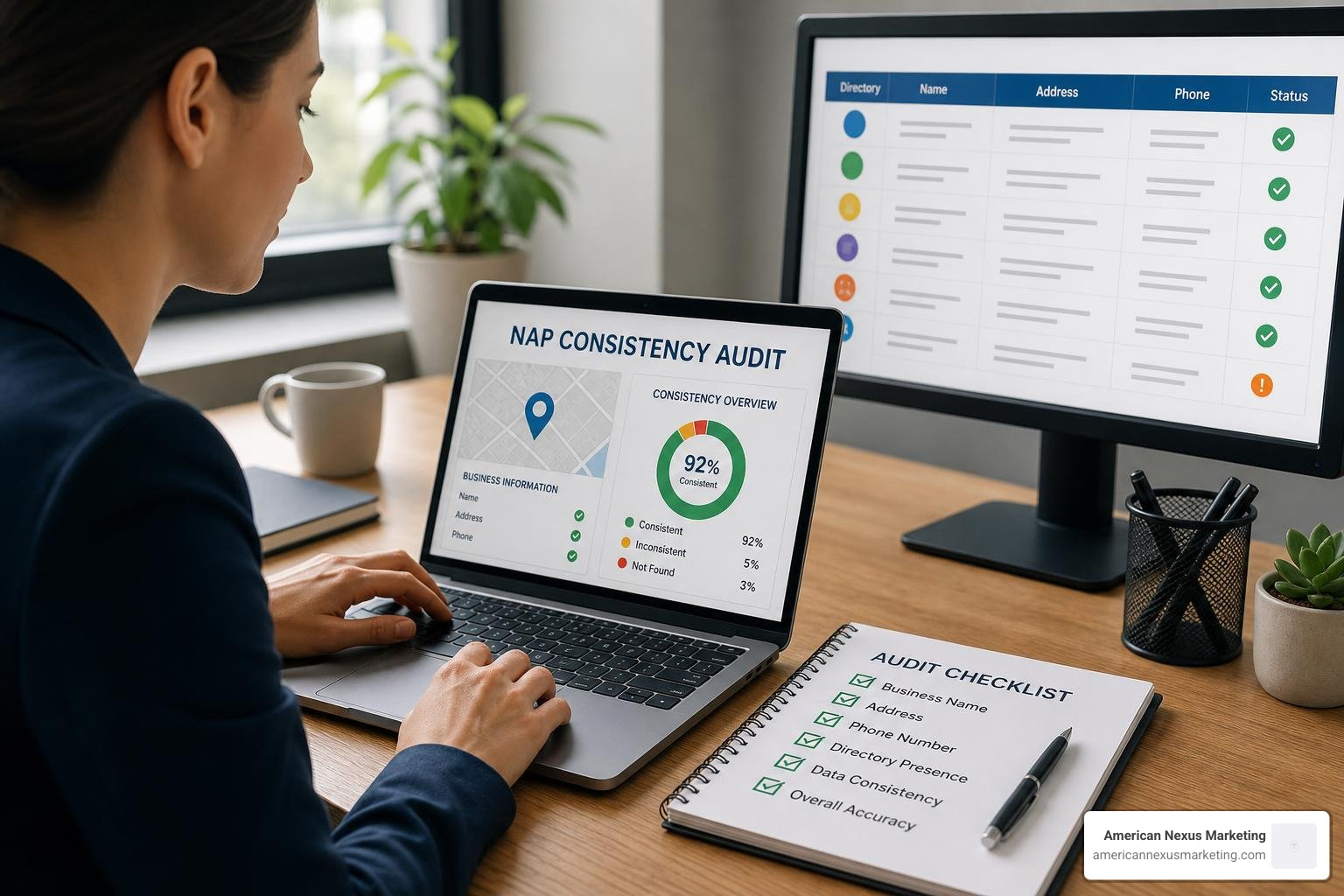
If you are a single-location business or a solo-founder team operating on a tight budget, you do not need to purchase expensive monthly software subscriptions to clean up your listings. A focused, manual audit can catch 90% of the issues that matter in about 45 minutes.
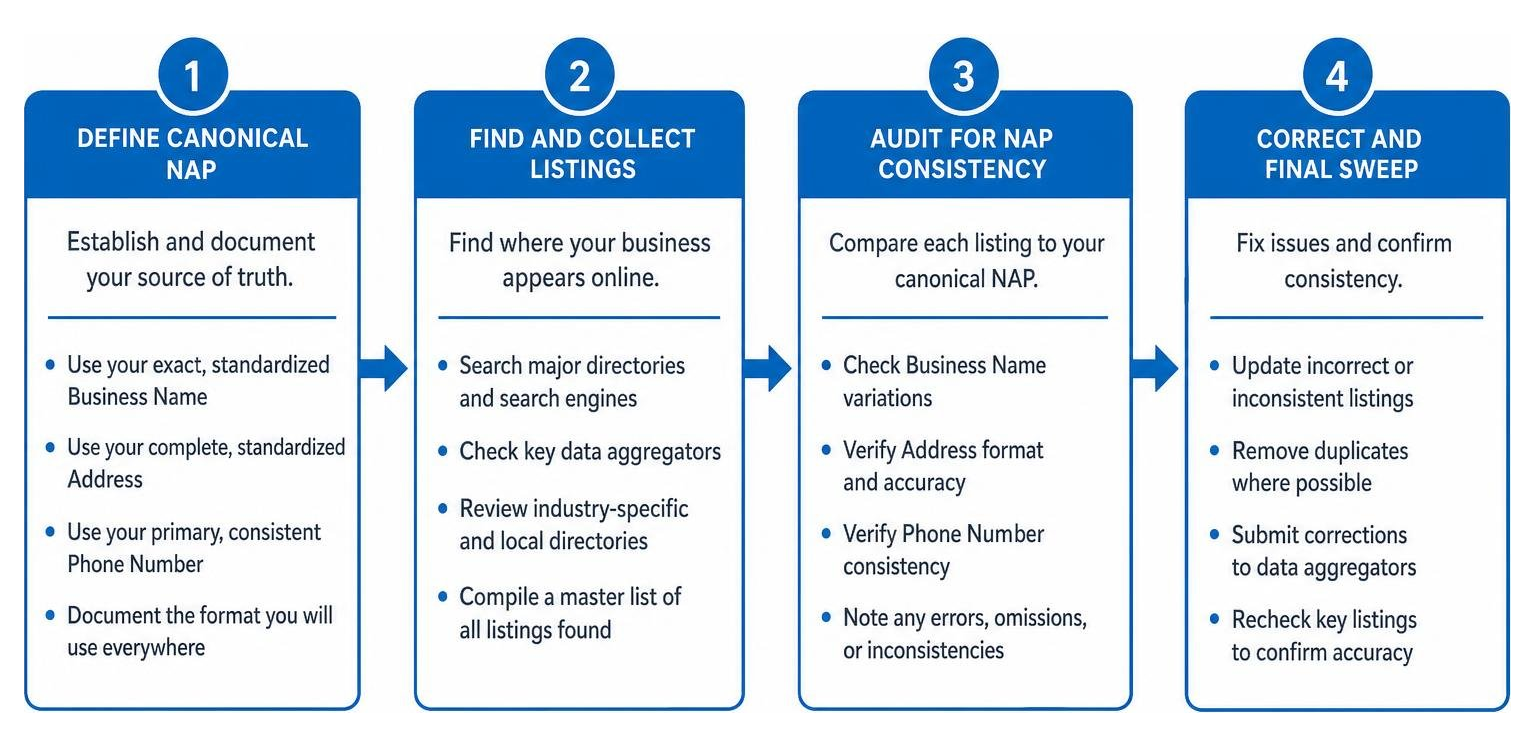
Here is our step-by-step framework to audit your business listings manually.
Step 1: Define and Document Your Canonical NAP
Before you check a single directory, you must establish your “source of truth.” This is your canonical NAP—the exact, standardized format you will use across the entire internet.
- Format your business name: Decide whether you will use punctuation (e.g., “Main Street Bakery” vs. “Main Street Bakery, LLC”). We recommend keeping it simple and omitting legal suffixes.
- Format your physical address: Run your address through the official USPS ZIP+4 lookup tool to find the exact standardized format recognized by postal databases. Decide on abbreviations (e.g., choosing “Ste” or “Suite” and sticking to it).
- Format your phone number: Pick one primary local phone number (or your call tracking setup) and write it down in a standard format (e.g., (555) 555-5555).
- Save this in a master document: Keep a simple text file on your computer with this exact information. Whenever you create or edit a listing, copy and paste directly from this document to eliminate manual typing errors.
Step 2: Audit Your Website and Schema Markup
Your website is the ultimate source of truth for search engines. If your site’s footer disagrees with your Google Business Profile, your entire citation network is built on a shaky foundation.
- Check the HTML footer: Ensure your NAP is clearly visible on every page of your website, typically in the footer or header, matching your canonical format exactly.
- Audit your LocalBusiness schema markup: Search engines read structured data (JSON-LD) to understand your business details. Use a schema testing tool to verify that your LocalBusiness schema matches your canonical NAP. Ensure there are no typos in your phone number or address fields within the structured code.
Step 3: Check the Critical Tier 1 Directories
Once your website is clean, check the primary platforms that carry the most weight in local search and AI search algorithms.
- Google Business Profile: This is your most important listing. Ensure your name, address, phone number, and website URL are perfectly aligned with your canonical document.
- Apple Maps: Apple recently consolidated its business listings into a unified platform called Apple Business (which launched as a free consolidated service on April 14, 2026). Log in and verify your physical map marker and contact details.
- Bing Places: Bing Places is incredibly important because it serves as the primary data source for Microsoft Copilot and ChatGPT’s local search queries. Ensure your listing is claimed and matches your GBP exactly.
- Facebook Business Page: Check your “About” section for formatting errors or old contact numbers.
- Yelp: Yelp is a high-authority citation source that feeds data to multiple automotive navigation systems and secondary search engines.
Step 4: Sweep Tier 2 and Tier 3 Directories
With your core platforms secured, it is time to hunt for stray listings across general and industry-specific directories.
- Perform a branded search audit: Open an incognito browser window and search for your business name in quotes (e.g., “Main Street Bakery”). Go through the first 3 to 4 pages of search results to find every directory listing your business.
- Search for old details: If you have moved or changed your phone number in the past, search for your old phone number or old address in quotes to locate legacy listings that need to be updated or removed.
- Check key secondary platforms: Inspect high-traffic platforms like the Better Business Bureau (BBB), MapQuest (which still attracts over 30 million monthly visitors), and Yellow Pages.
How to Fix Inconsistencies and Maintain Your Listings
Finding inconsistencies is only half the battle; you must systematically resolve them to regain your local ranking power.
When you find an error, use this process to resolve it:
- Claim the listing: If you do not own the incorrect listing, look for a “Claim this business” or “Own this business?” link on the directory page. You will typically need to complete a quick phone or email verification.
- Submit manual corrections: For directories you already control, log in and update the fields using your copy-paste master template.
- Contact support for stubborn duplicates: If you find duplicate listings for your business on the same directory, look for a “Report Duplicate” button or contact their support team to merge the profiles. This consolidates your authority and reviews into a single page.
- Allow time for propagation: Do not expect search engines to update their indexes instantly. It typically takes 2 to 4 weeks for corrections to propagate through search indexes and show up in automated audits.
Free vs. Paid Tools for Your NAP Consistency Audit
If you want to speed up the process or manage multiple locations, several tools can help automate the detection of listing errors. Here is a direct comparison to help you choose the right path for your business:
| Feature / Aspect | Free Manual Audit (DIY) | Paid Citation Audit Services |
|---|---|---|
| Ideal For | Single-location small businesses, solo founders, and low-budget startups. | Multi-location businesses, franchises, and busy marketing teams. |
| Cost | $0 (Only your time). | $99 to $499+ (Subscription or one-time fee). |
| Time Investment | Approximately 45 minutes to audit; 2 to 3 hours to fix. | 5 to 10 minutes to set up; automated background tracking. |
| Accuracy | Extremely accurate for the directories you manually check. | High, with automated string-matching algorithms. |
| Discovery | Limited to search engine results pages and major platforms. | Searches hundreds of obscure directories and data aggregators. |
To help you get started, you can use these free resources and tools to run an initial check:
- For an easy way to check your details across multiple platforms, use the NAP Consistency Checker – Visiblytics .
- If you want to evaluate your citations and see where inconsistencies lie, try the Citation Audit Tool, NAP Consistency Checker \| LinkGathering .
- To build a comprehensive roadmap for your cleanup, follow the SEO NAP Checker 2026: Free Local Citation & NAP Consistency Checklist \| Backlynk .
- To quickly cross-reference your website data against your Google Business Profile, try the Free NAP Consistency Checker — SEO NAP Checker Tool \| Local SEO Audit Tool .
Our recommendation for single-location businesses is simple: perform a manual cleanup of your top 15 directories first. This manual approach produces about 90% of the local SEO benefit at 10% of the cost of expensive automated platforms. Save paid aggregator services for when you are managing dozens of locations or competing in highly saturated markets.
Frequently Asked Questions About NAP Audits
How often should I audit my business NAP consistency?
We recommend performing a NAP consistency audit at least once per quarter. If you operate in a highly competitive niche or a multi-location setup, monthly monitoring is ideal. You should also run an immediate audit anytime your business relocates, changes its primary phone number, or undergoes a rebranding process. Quarterly audits are necessary because data brokers constantly re-sync old databases, which can occasionally re-introduce old, incorrect data back onto minor directories.
Can I use a toll-free number instead of a local number?
While you can use a toll-free (800) number, we strongly recommend using a local phone number with a local area code as your primary contact number. Local area codes signal geographic relevance and local proximity to search engines, helping to reinforce your physical presence in your target market. If you must use a toll-free number for customer convenience, list it on your website alongside your local number, but keep your local number as the primary contact on your local directory listings.
How long does it take for NAP corrections to update online?
The time it takes for corrections to reflect online varies by directory. Major platforms like Google Business Profile and Bing Places usually update within a few hours to a couple of days. However, secondary directories and independent local sites can take anywhere from 2 to 4 weeks to process updates. If you are submitting corrections directly to major data aggregators, it may take up to a few months for those changes to filter down to the smallest directories.
Conclusion
Maintaining identical business details across the web is not a flashy marketing tactic, but it is the bedrock of local search engine optimization. When search engines and AI assistants find matching, highly consistent NAP data everywhere they look, they can confidently recommend your business to local searchers.
Don’t let minor formatting errors or outdated directory listings quietly drain your visibility. Block out 45 minutes this week, establish your canonical NAP, and clean up your top listings.
Ready to fully optimize your local digital footprint? We’ve put together a comprehensive, step-by-step roadmap designed specifically for small businesses and solo-founder teams. Get your complete local SEO checklist for 2026 to start dominating your local market today!
Pingback: Citation Cleanup Service: Boost Your Rankings Now
Pingback: Local SEO Google Search: Master the 2026 Blueprint