
The Real CRM Software Cost for Small Business and How to Avoid Overpaying
What Does CRM Software Really Cost for Small Businesses?
Understanding crm software cost for small business is simpler than most vendors make it seem. Here’s a quick breakdown before we dive deeper:
| Plan Type | Typical Cost | Best For |
|---|---|---|
| Free tier | $0 | Solo founders, 1-2 users |
| Starter/Entry-level | $7 – $25/user/month | Small teams, basic automation |
| Professional | $40 – $100/user/month | Growing teams, advanced features |
| Enterprise | $175 – $300+/user/month | Larger orgs, full customization |
The short answer: Most small businesses will spend somewhere between $0 and $50 per user per month on a CRM subscription. But the subscription is rarely the whole story.
The CRM market hit $73.4 billion in 2024 and is on track to surpass $100 billion by 2027. That growth has flooded the market with options — and wildly different price tags. You can find tools charging $15/month and tools charging $300/month for what looks like the same core feature set.
That gap is where small business owners get burned.
Hidden costs like implementation, data migration, premium support, and paid add-ons can quietly double or triple what you expected to pay. And free plans — while genuinely useful — come with limits that often force an upgrade right when your business starts gaining traction.
This guide cuts through the noise so you know exactly what you’re paying for, what you can skip, and how to avoid overpaying.
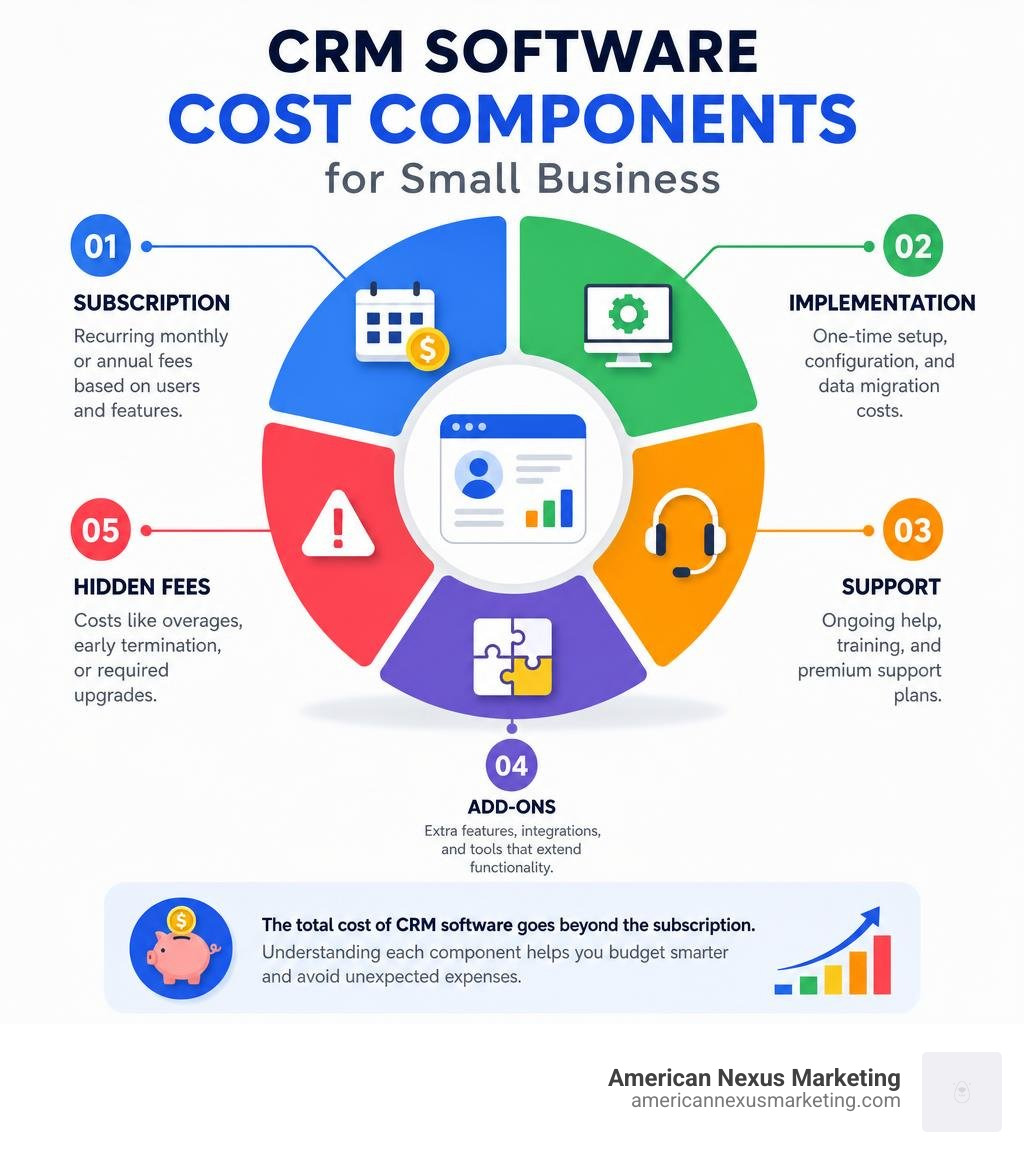
Understanding the CRM Software Cost for Small Business
When we look at the market in July 2026, it is easy to get overwhelmed by the sheer variety of CRM pricing pages. Every vendor has a different way of packaging their features, but they all boil down to a few standard pricing models.
Most off-the-shelf CRMs use one of two primary structures:
- Per-User (or Per-Seat) Pricing: This is the most common model. You pay a set monthly fee for every employee who needs access to the system. If you have three users on a $25 plan, your base subscription is $75 per month.
- Record-Based or Contact-Based Limits: Some platforms limit the total number of records (contacts, deals, companies, or pipeline stages) you can store in the database. If your list grows beyond that limit, you are pushed into a higher tier even if your team size remains the same.
Understanding how these models interact is the first step toward budget predictability. For instance, Salesforce Small Business Pricing: All-in-One CRM Solutions | Salesforce offers a range of options that scale from free entry-level suites to highly customized, contract-bound enterprise plans. If you do not map out your growth trajectory, you might start on a cheap tier only to find yourself facing a massive bill as soon as you add a few more team members or import a new lead list.
Direct Subscription Fees: What Drives CRM Software Cost for Small Business?
The base subscription is the most visible part of your crm software cost for small business, but what exactly are you paying for? Vendors typically tier their pricing based on three main levers:
- User Seats: Every added team member increases your monthly bill. If you are on a plan like CRM Pricing Plans | Affordable CRM Software Costs | Pipedrive, which offers plans like the Lite tier starting at €14 per seat/month (billed annually), adding five users means budgeting around €70 per month.
- Data and File Storage: Most CRMs provide a default amount of storage per user or per account. If your sales reps upload heavy PDF proposals, contracts, or images, you can quickly hit those limits and face unexpected overage fees.
- Feature Tiers: Basic plans handle contact management and simple pipelines. If you want advanced automation, custom fields, sales forecasting, or built-in AI tools, you will have to step up to professional or enterprise tiers.
Many platforms offer substantial discounts — sometimes up to 35% to 42% — if you opt for annual billing instead of paying month-to-month. While this saves money in the long run, it does require a larger upfront cash commitment, which can be tough for boot-strapped startups.
Hidden Fees That Inflate CRM Software Cost for Small Business
The subscription price is simply the ticket to get into the theater; it doesn’t buy your popcorn. When calculating your true budget, we must look out for several hidden costs that vendors often bury in the fine print:
- Implementation and Customization: Setting up a CRM can range from a quick weekend project to a massive undertaking. While simple platforms cost next to nothing to set up, complex legacy implementations can easily exceed $150,000 if you need to hire external consultants or developers.
- Data Migration: Moving your messy spreadsheets or old database into a new CRM can be a technical headache. If you need clean, deduplicated data mapped correctly, you might have to pay for specialized migration tools or professional services.
- Premium Support: Standard subscriptions usually only grant you access to self-guided help centers or slow email support. If you want 24/7 phone support or guaranteed response times, vendors often charge extra. For example, some enterprise-grade support plans (like Salesforce’s Premier Success Plan) cost an additional 30% of your net license fees.
- API and Integration Fees: Connecting your CRM to your accounting software, email marketing platform, or e-commerce store isn’t always free. Some tools charge for API access or require you to purchase third-party connector apps.
- Transaction Fees: If your CRM includes built-in payment links or commerce features, expect pay-as-you-go fees. For instance, credit card transactions in the US typically incur fees around 2.9% + $0.30 per transaction.
- Email and Marketing Limits: Many entry-level plans cap your marketing email sends (often around 2,000 emails per month) and charge incremental bundles, such as $10 per month for an additional 1,000 sends, if you exceed the limit.
Free CRM Options and Their Real Limitations
Almost every major CRM vendor offers a free plan or a free trial to get you hooked. These free tiers are fantastic for solo founders and micro-businesses trying to organize their data without spending a dime.
However, “free” always comes with strings attached:
- Strict User Caps: Free plans are usually restricted to 1 or 2 users. The moment you hire your third employee, you are forced onto a paid tier.
- Record Limits: Platforms like Zoho Bigin limit their free tier to 500 records. A record is any row of data — a contact, a company, a note, or an activity. If you run a simple cold outreach campaign, you can burn through 500 records in a single afternoon.
- Feature Gatekeeping: Essential tools like automated email sequences, custom pipelines, reporting dashboards, and integrations are almost always locked behind paid paywalls.
- The Upgrade Trap: Vendors make it incredibly easy to sign up for a free plan, but once your entire business database is stored in their system, migrating to a cheaper competitor is painful. They know that once you hit their limits, you are highly likely to pay their subscription price rather than go through the hassle of moving your data elsewhere.
Comparing Popular CRM Pricing Models and Tiers
To help you visualize how different solutions stack up, let’s look at a clear comparison of CRM options for a team of three users:
| Feature/Tier | Starter/Entry-Level | Professional Tier | Custom-Built CRM |
|---|---|---|---|
| Average Monthly Cost | $21 – $75 (Total) | $120 – $300 (Total) | $21,000 – $42,500 (Amortized) |
| Setup Time | Minutes to hours | Days to weeks | 6 months to 2 years |
| Customization | Low (Basic fields only) | Medium to High | Unlimited |
| Best For | Solo founders, micro-teams | Growing sales teams | Highly specialized industries |
Choosing the right tier depends entirely on your operational complexity. Let’s map out the typical decision path:
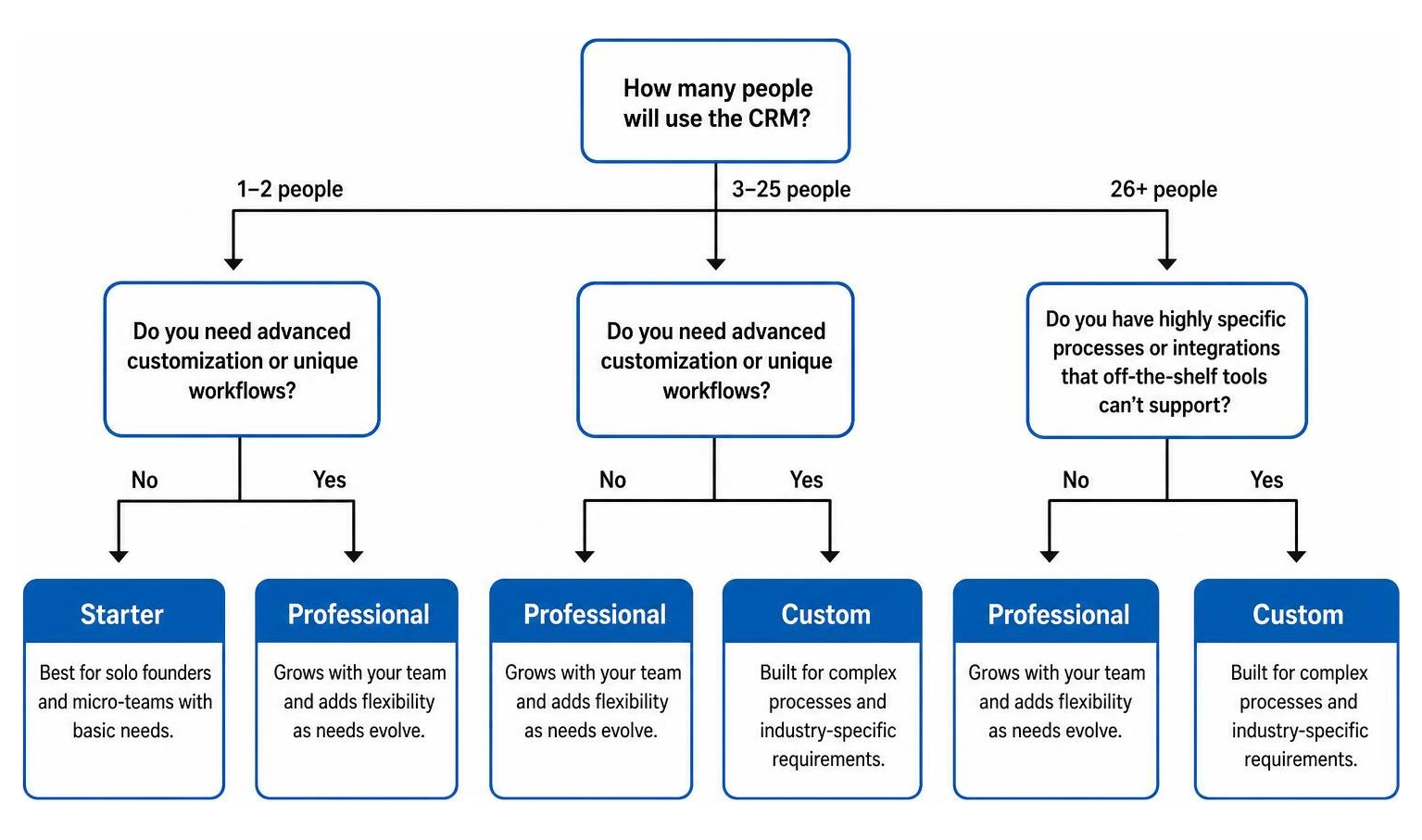
Entry-Level and Starter Suites
For most small businesses, entry-level suites are the sweet spot. They provide a massive upgrade over scattered spreadsheets without breaking the bank.
A perfect example is Starter Suite CRM: Try Free Today | Salesforce, which is priced at $25 per user per month. It brings sales, service, marketing, and basic commerce into a single app with zero complex setup. To make it even more accessible for small budgets, you can often find promotional discounts — such as saving 70% on the Starter Suite by using the code STARTER70 at checkout.
On the ultra-affordable side, Bigin Pricing and Editions | The Most Affordable CRM offers a free single-user plan and paid plans starting at just $7 per user per month (billed annually). This is an incredibly cost-effective way for a small business to access visual pipelines, activity tracking, and telephony integrations.
Professional and Enterprise Tiers
As your business grows, your workflows will naturally become more complex. This is when you outgrow basic starter tools and need to look at professional tiers, which typically range from $40 to $100+ per user per month.
For example, the Salesforce Pro Suite costs $100 per user per month (billed annually, contract required). What does that extra money buy you?
- Deep Customization: The ability to create custom objects, custom apps, and tailored page layouts that fit your exact business process.
- Advanced Automation: Complex, multi-stage workflows that route leads, update records, and trigger external actions automatically.
- Sales Forecasting: Advanced reporting tools that analyze your pipeline to predict future revenue with high accuracy.
- Sandbox Testing Environments: A safe, isolated duplicate of your CRM where you can build and test new integrations or workflows without risking your live customer data.
While these features are incredibly powerful, they also require more internal expertise to manage. If you pay for a professional tier but don’t have the time or skills to set up these advanced tools, you are simply throwing money away.
Custom Built vs. Off-the-Shelf Solutions
Every now and then, a small business owner gets frustrated by the limitations of off-the-shelf software and thinks: “Why don’t we just build our own custom CRM from scratch?”
Unless you run a highly specialized business with proprietary processes that no existing software can replicate, don’t do it.
Building a custom CRM system from scratch is incredibly expensive. Employing a small team of just three software engineers to build and maintain a custom tool can easily cost between $255,000 to $510,000 per year in salaries alone. It also takes months — if not years — to deploy, meaning your time-to-value is incredibly slow.
In contrast, modern off-the-shelf SaaS platforms can be deployed in minutes, cost a fraction of the price, and benefit from millions of dollars of continuous R&D.
Calculating Total Cost of Ownership (TCO) vs. ROI
To make a smart financial decision, we must look past the monthly subscription and calculate the Total Cost of Ownership (TCO).
To find your TCO over a 12-month period, use this simple formula:
For example, let’s look at a team of 3 users adopting a customer service-focused setup like Customer Service CRM with Starter Suite | Salesforce:
- Subscription: $25/user/month = $900/year
- Onboarding/Setup: $0 (using built-in guided checklists)
- Email Add-on (extra 1,000 sends/month): $10/month = $120/year
- Soft Costs (10 hours of team training at $30/hr): $300
- Total 1-Year TCO: $1,320
Once you have your TCO, you can weigh it against your expected Return on Investment (ROI). According to a study by Nucleus Research, the average CRM delivers $3.10 in return for every $1 spent.
This return comes from:
- Time Saved: Automating administrative tasks, data entry, and follow-up emails.
- Increased Win Rates: Ensuring no leads fall through the cracks of a messy inbox.
- Better Retention: Resolving customer support issues faster using a unified workspace.
If spending $1,320 on a CRM saves your team just 5 hours of manual work per week, the software pays for itself many times over.
Frequently Asked Questions About CRM Costs
What is the average CRM software cost for small business?
For a typical small business with 2 to 5 users, the average CRM software cost ranges from $15 to $50 per user per month (billed annually) for a starter or mid-tier plan. This equates to an annual software spend of roughly $360 to $3,000.
Are there completely free CRMs with no hidden limits?
No. Every free CRM has limits designed to encourage paid upgrades. These limits typically restrict the number of users (usually capped at 1 or 2), the number of contact records you can store, or your monthly email marketing volume. However, for solo founders or very small teams, these free tiers are an excellent way to get organized before committing financially.
How much does it cost to implement a CRM?
For most small businesses using modern, out-of-the-box CRMs, implementation costs are virtually $0 if you handle the setup yourself using built-in guided checklists and free onboarding resources. However, if you require complex data migration from legacy databases, custom API integrations, or external consulting, implementation costs can range from $5,000 to over $150,000.
Conclusion
Finding the right CRM doesn’t have to mean overpaying for enterprise-grade features you will never use. By understanding the true drivers of crm software cost for small business — and keeping a close eye on hidden fees like storage overages, support plans, and transaction costs — you can choose a platform that fits both your workflow and your budget.
At American Nexus Marketing, we believe in practical, jargon-free digital marketing and operational guidance tailored specifically for low-budget, solo-founder, and micro-business teams. You don’t need a massive IT department to build a highly efficient, automated sales and support pipeline.
If you are ready to stop managing your business out of messy spreadsheets and find the perfect, cost-effective tool for your team, check out our comprehensive checklist on how to Find the Best CRM for Your Small Business.
Pingback: Email Campaign Process Flow: Proven Guide
Pingback: Software Similar to HubSpot: Best 2026 Picks
Pingback: Low Cost CRM Software for Small Business in 2026
Pingback: CRM Software for Startups: Ultimate Growth Guide
Pingback: Dotmailer Salesforce Integration Made Easy in 2026