
Why You Need CRM Software with Email Integration Right Now
Why CRM Software with Email Integration Is a Game-Changer for Small Businesses
If you’re comparing CRM software with email integration, here are the top options worth your attention right now:
| CRM | Best For | Starting Price | Free Plan |
|---|---|---|---|
| HubSpot | All-in-one beginners | $15/user/month | Yes |
| Salesflare | Sales teams, automation | $49/user/month | No |
| Zoho CRM | Budget-conscious teams | Free (3 users) | Yes |
| Pipedrive | Email tracking & pipelines | ~$14/user/month | No |
| ActiveCampaign | Email automation depth | ~$15/month | No |
| Klaviyo | E-commerce brands | Free tier available | Yes |
For most small business owners, email is still the primary way you talk to leads and customers. But if you’re managing those emails in one tab and your customer data in another — or worse, a spreadsheet — you’re losing time and deals every single day.
That’s exactly the problem that CRM software with email integration solves.
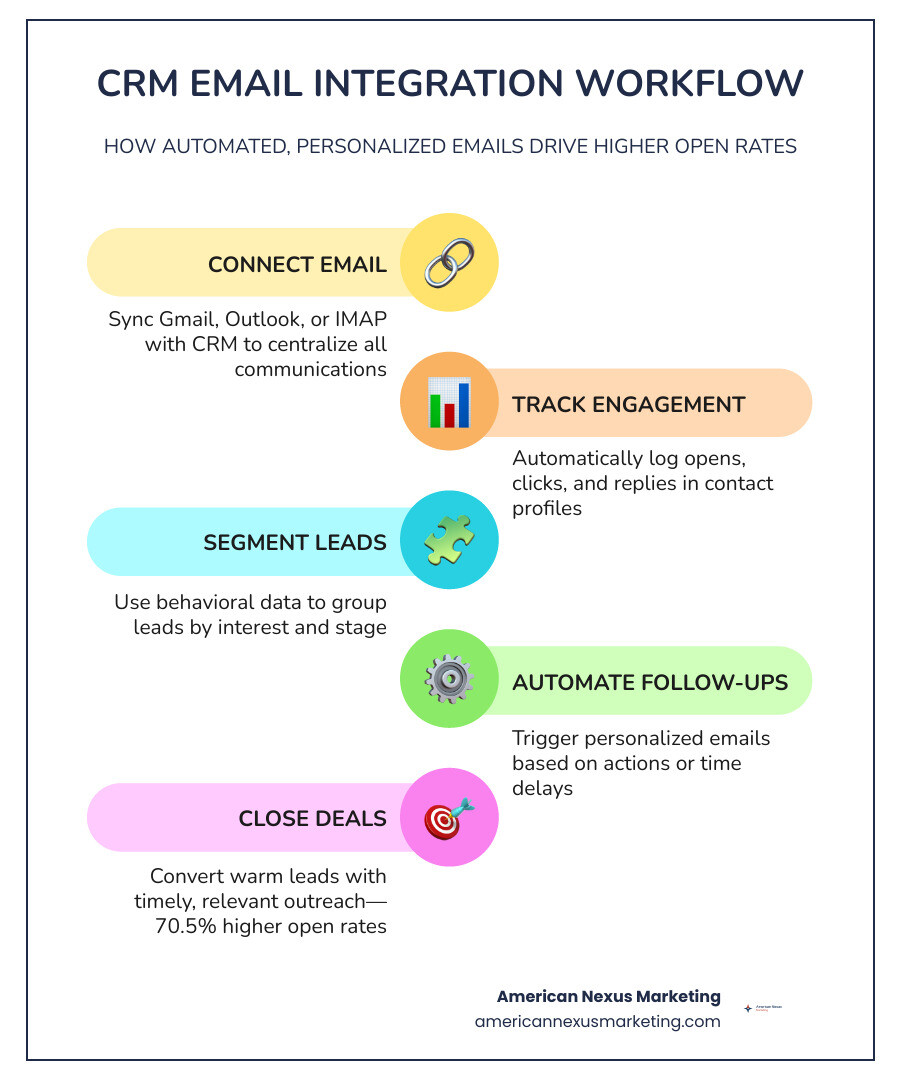
Instead of jumping between apps, a good email-integrated CRM puts your contact history, deal status, and email communication in one place. You can track who opened your email, automate follow-ups, and never let a lead go cold by accident.
The numbers back this up. Automated emails generate 70.5% higher open rates than generic blasts. Companies using email automation are 2x more effective at lead generation. And personalized automated messages see a 46% higher open rate compared to standard marketing emails.
This isn’t just an enterprise tool anymore. Solo founders and small teams are using these platforms — often for free or close to it — to punch well above their weight.
What is CRM Email Marketing and How It Drives Growth
Many business owners ask us: Isn’t standard email marketing the same thing as CRM email marketing?
Not quite. Standard email marketing platforms are built for broadcast blasts. You write one newsletter, filter a basic list, and hit “send” to thousands of people at once. It is a one-way megaphone.
CRM email marketing, on the other hand, is a two-way conversation powered by real-time customer data. Because your email tool is connected directly to your customer database, your emails can react dynamically to how a customer actually behaves.
For example, instead of sending a generic discount email to your entire list, an email-integrated CRM can automatically trigger a personalized message the moment a lead views your pricing page three times in one day. It blends transactional data, pipeline stages, and past communication history to make sure your outreach is highly relevant.
This level of personalization is why lead nurturing works so much better inside a CRM. When you nurture leads with automated, database-driven emails, you can expect to increase the revenue generated from those leads by 10% or more.
If you are currently evaluating your options and want to see how different platforms scale, check out the ultimate guide to companies like hubspot for growing businesses to see which platforms offer the best mix of database depth and email execution.
Core Features of CRM Software with Email Integration
When you are shopping for crm software with email integration, it is easy to get overwhelmed by feature lists. To keep things simple, here are the absolute non-negotiables you should look for:
- Two-Way Sync: This ensures that when you send or receive an email in Gmail or Outlook, it instantly shows up in your CRM, and vice versa. No manual BCCing required.
- Real-Time Email Tracking: You should get an instant notification when a prospect opens your email or clicks a link. This lets you time your follow-up calls perfectly.
- Shared Inboxes: For team aliases like
sales@orinfo@, a shared inbox lets your entire team collaborate on incoming messages, assign owners, and track response times. - Auto-Contact Creation and Signature Enrichment: The best CRMs will read incoming email signatures and automatically create or update contact profiles (including phone numbers and job titles) without you lifting a finger.
- Custom Templates: Instead of writing the same introduction or follow-up email fifty times a week, you should be able to pull up templates that auto-populate the recipient’s first name, company, and deal info.
If you want an easy-to-use platform that handles these core features beautifully, sales CRM software is an excellent place to start. It offers robust two-way syncing and extensive customization options that keep your inbox and database perfectly aligned.
Maximizing Sales Productivity with Email Automation
If you are still sending every sales follow-up manually, you are leaving money on the table. Manual outreach is slow, prone to human error, and incredibly hard to scale.
By automating your outreach and follow-up sequences inside a CRM, you can increase your email reply rates by up to 250%. Think about what that does for your sales pipeline: instead of spending hours typing out “just checking in” emails, your sales reps only spend time talking to leads who have actively replied and raised their hands.
To see the difference clearly, let’s look at how manual outreach stacks up against automated CRM workflows:
| Task / Feature | Manual Outreach | Automated CRM Email |
|---|---|---|
| Follow-up Timing | Whenever you remember (often days late) | Instant, based on behavioral triggers |
| Data Entry | Manual copy-pasting of contact details | Auto-populated using CRM merge tags |
| Tracking | Guessing if they read it | Real-time open and click notifications |
| Scale | Limited to 20-30 personalized emails/day | Hundreds of hyper-personalized emails/day |
| Consistency | Leads regularly fall through the cracks | 100% of leads receive the scheduled sequence |
This level of automation keeps your pipeline moving 24/7. If you want to connect your CRM to external email marketing tools you might already use, check out our guide on how to find the best crm software integrated with mailchimp to learn how to keep your automated workflows synchronized across platforms.
Choosing the Right Email CRM for Your Business Size
Your business size dictates what you should prioritize when choosing a CRM.
For small businesses and solo founders, your biggest enemies are complexity and cost. You don’t have a dedicated IT department to spend three months configuring a database. You need a tool that is easy to set up, offers clear email templates, and automatically logs your Gmail or Outlook messages.
We highly recommend reading our small team crm guide free and cheap tools that actually work to find budget-friendly platforms that don’t sacrifice essential email features.
For enterprise companies, the priorities shift toward deep customization, advanced security, and massive data handling. Enterprise teams need to process millions of customer events daily, run complex lead-routing rules, and manage strict compliance standards across multiple countries.
Regardless of your size, you must watch out for hidden costs. Many CRMs look cheap on paper but charge heavily for contact list expansions or email volume limits. To protect your budget, review our breakdown of the real crm software cost for small business and how to avoid overpaying.
Evaluating Free vs Paid CRM Software with Email Integration
It is incredibly tempting to jump straight onto a free CRM tier. Platforms like HubSpot and Zoho offer fantastic free plans that are perfect for startups looking to get off spreadsheets.
However, free plans always come with boundaries. The most common limitation is on email integration features. For example, a free plan might let you connect your personal Gmail account, but it will restrict you from sending mass emails, using automated email sequences, or setting up team-wide shared inboxes.
Paid email marketing CRMs (like Salesflare, ActiveCampaign, or paid tiers of Zoho) unlock full two-way syncing, automated multi-step sequences, and advanced API access. If you have developers on your team and want to programmatically send highly customized transactional emails directly through your CRM database, you will need a paid tier that supports tools like the Zoho developer API documentation.
How to Avoid Pitfalls When Deploying CRM Software with Email Integration
Connecting your business email to a CRM is incredibly powerful, but if you do it wrong, you can run into serious technical headaches. Here are the three most common pitfalls and how to avoid them:
- Ignoring Domain Authentication (SPF, DKIM, and DMARC): If you send bulk emails or automated sequences directly from your CRM without properly configuring your domain’s DNS settings, email servers (like Gmail and Yahoo) will flag your messages as spam. Always set up SPF, DKIM, and DMARC records before launching your first campaign.
- Creating Accidental Data Silos: Ensure your CRM uses true two-way synchronization rather than simple one-way BCC email tracking. One-way tracking requires your team to remember to copy a special email address on every message, which inevitably leads to missed conversations and incomplete records.
- Over-automating and Losing the Personal Touch: It is easy to set up a 10-step automated sequence, but if your emails sound like robotic templates, your reply rates will plummet. Keep your automated emails short, conversational, and highly personalized.
To see how modern platforms handle these challenges smoothly, explore Pipedrive’s communication tracking features to learn how to keep your deliverability high and your team’s communication organized.
Frequently Asked Questions about CRM Email Integration
How do CRMs integrate with Gmail and Outlook?
Most modern CRMs offer two primary ways to connect with Gmail and Outlook:
- Direct OAuth Sync (IMAP/POP3): You securely log in to your Google Workspace or Microsoft 365 account through your CRM settings. This establishes a secure, continuous link that automatically syncs sent and received emails, calendar events, and contacts in the background.
- Inbox Add-ons / Sidebar Extensions: These are lightweight apps you install inside your Gmail or Outlook interface. They bring your CRM data directly into your inbox, letting you view a sender’s deal status, add notes, and create new contact records without ever leaving your email client.
For a great example of how a CRM can act as both an active inbox and a customer database, take a look at the native email features in CRM platforms designed specifically for small, fast-moving teams.
Can a CRM handle multi-channel marketing like SMS and social?
Yes! Many modern platforms have evolved from basic email managers into complete omnichannel engines.
For example, B2C-focused platforms like Klaviyo process an average of 2.5 billion daily events to help consumer brands coordinate personalized campaigns across email, SMS, mobile push notifications, and WhatsApp. Enterprise CRMs use advanced AI agents (like Salesforce’s Agentforce or Klaviyo’s Customer Agent, which autonomously resolves 65% of customer service questions) to keep conversations seamless across every single channel.
How do CRMs track email opens and click-through analytics?
CRMs track user engagement using two main technologies:
- Tracking Pixels (for Opens): When you send an email with tracking enabled, the CRM embeds a tiny, invisible 1×1-pixel image at the bottom of the message. When the recipient opens the email, their email client downloads that image from the CRM’s servers, registering an “open” event in your database along with the time and approximate location.
- Link Wrapping (for Clicks): Any URL you include in your email is automatically replaced with a unique tracking link pointing back to your CRM. When a prospect clicks the link, they are instantly redirected through the CRM’s tracking server to the destination page, logging the click-through event in real time.
Conclusion
At American Nexus Marketing, we believe your business data deserves better than scattered spreadsheets and disconnected tools. Integrating your business email with a dedicated CRM is the single fastest way to reclaim your time, professionalize your outreach, and ensure no lead ever slips through the cracks.
Whether you are a solo founder launching your first startup or a growing team looking to scale your sales pipeline, there is an email-integrated CRM built to fit your budget and workflow.
Ready to see how the top marketing and sales platforms stack up against each other this year? Compare the best all-in-one marketing platforms of 2026 and find the perfect hub to power your business growth.