
Why Google Local Listing Optimization Is the Fastest Way to Get Found by Nearby Customers
Google local listing optimization is the process of fully setting up, completing, and actively managing your Google Business Profile so that nearby customers find your business first when they search on Google Maps or Search.
Here’s what it involves at a glance:
- Claim and verify your Google Business Profile at business.google.com
- Complete every field — business name, address, hours, categories, and attributes
- Add photos and videos to increase clicks and build trust
- Collect and respond to reviews consistently
- Post regular updates to signal that your business is active
- Keep your info consistent across every online directory
- Add LocalBusiness schema to your website to reinforce your listing
Picture two businesses offering the exact same service in the same neighborhood. Same quality. Similar pricing. But one shows up at the top of Google Maps every time a nearby customer searches — and the other is nowhere to be found.
The difference almost always comes down to one thing: how well their Google Business Profile is optimized.
Your Google Business Profile is essentially a free digital storefront. When someone nearby searches for what you offer, Google decides in seconds whether to show your business or your competitor’s. A profile that’s incomplete, inconsistent, or ignored gets buried. A profile that’s fully built out and actively managed can rank at the very top — at zero cost per click.
Nearly 90% of consumers trust online reviews as much as personal recommendations. Businesses with photos on their profile get significantly more direction requests and website clicks than those without. And profiles with 50 or more high-quality photos consistently outperform sparse ones in both rankings and click-through rates.
This guide walks you through exactly how to optimize your Google local listing — step by step, without jargon — so you stop hiding from customers who are already searching for you.
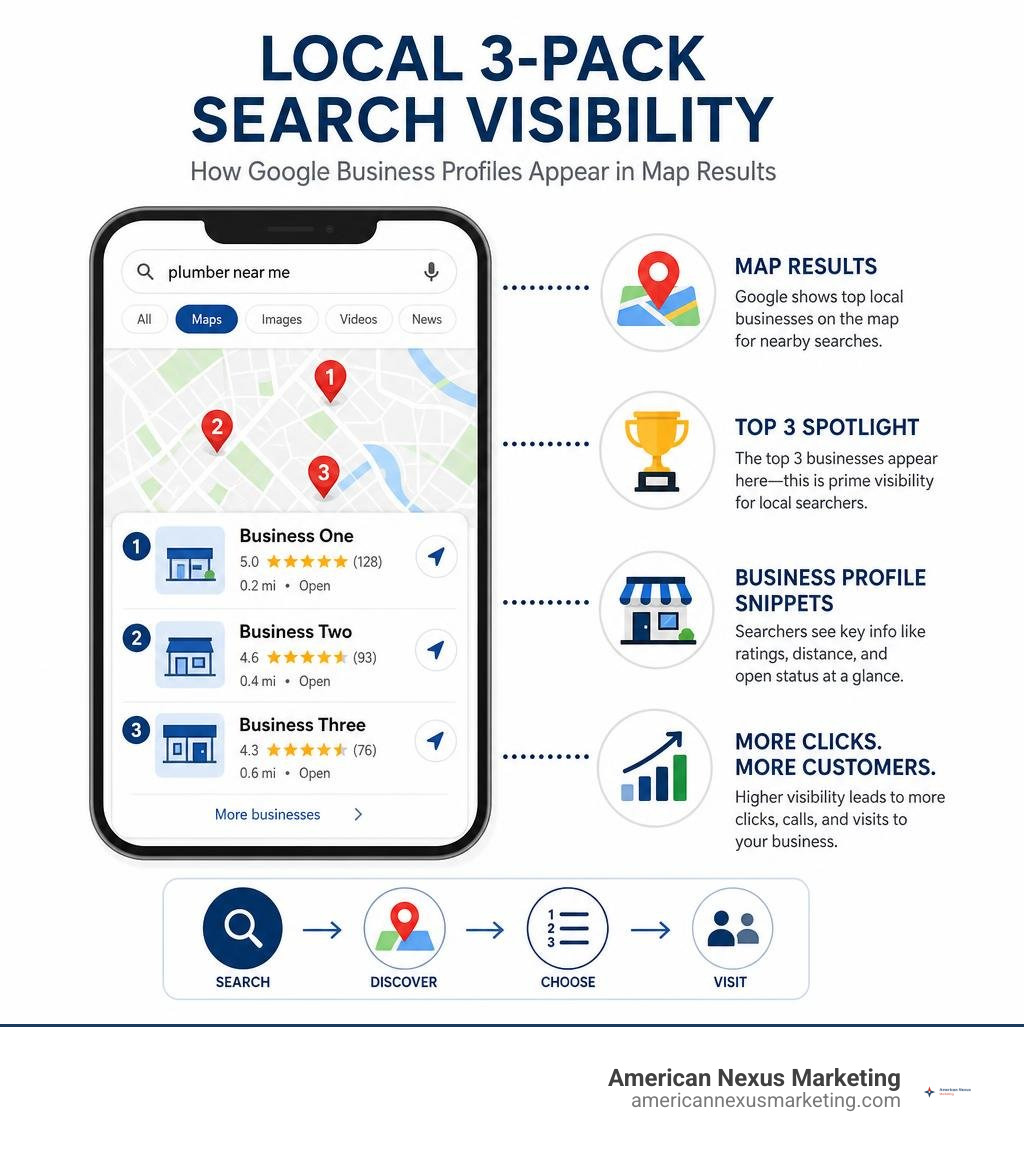
Google local listing optimization word roundup:
The Core Pillars of Google Local Listing Optimization
To understand how to master google local listing optimization, we first have to understand how Google’s local search algorithm actually thinks. Google does not randomly throw pins on a map. Instead, it relies on three core pillars to decide which businesses get highlighted in the coveted Local 3-Pack and which ones are pushed to page five.
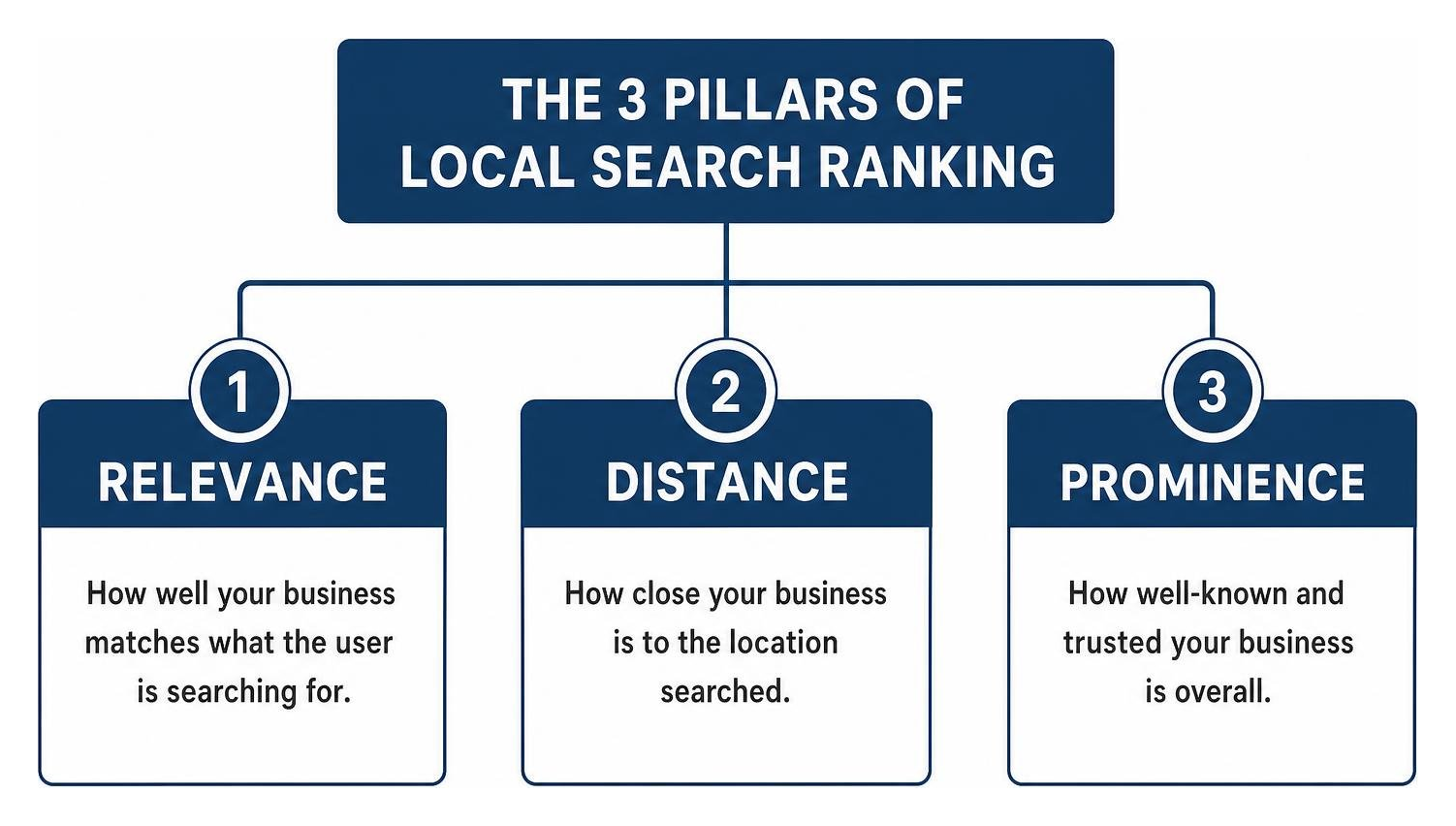
According to the official guidelines on how to improve your local ranking on Google, the search giant calculates local results based on three key factors: Relevance, Distance, and Prominence. Let’s break these down to see how they directly affect your visibility and why they form the foundation of any successful plan to improve local seo.
Relevance: Matching Search Intent
Relevance is all about how well your business profile matches what a user is actively searching for. If someone types “organic pet food shop” into Google, the algorithm scans local profiles to find businesses that explicitly offer exactly that.
To maximize your relevance, you cannot leave any field blank on your Google Business Profile. This means adding detailed business descriptions, selecting highly accurate categories, and checking off specific attributes (like “wheelchair accessible” or “outdoor seating”). The more detailed and complete your business information is, the easier it is for Google’s search algorithms to match your profile with relevant local queries. If you are starting from scratch, we have put together a comprehensive guide on how to get listed on Google with a free Business Profile to help you build a solid relevance baseline.
Distance: The Proximity Factor
Distance is exactly what it sounds like: how close your physical business is to the searcher or the geographic terms they used in their query (like “plumber in North Seattle”).
If a user has location services turned off on their device, Google does not just give up. Instead, it estimates their location using other available signals, such as their IP address, past searches, and cellular data. Because proximity is a heavily weighted ranking factor, you cannot easily trick the system into showing your business to someone fifty miles away if there are dozens of closer options. However, you can make sure your coordinates and physical address are mathematically precise so you dominate your immediate geographic neighborhood.
Prominence: Building Authority and Trust
Prominence refers to how well-known or popular your business is, both in the physical world and across the digital landscape. Some places are naturally prominent—like famous museums, historic landmark hotels, or iconic local restaurants. For the rest of us, prominence must be built from the ground up.
Google measures digital prominence by scanning the entire web for signals. It looks at your website’s organic search rankings, the quality of backlinks pointing to your site, and how often your business is mentioned in local directories.
But the biggest prominence signal of all? Your reviews. A steady stream of positive ratings and active, helpful responses tells Google that your business is trusted by real people in the real world. If you want to accelerate this authority-building process, working with the best local seo expert can help you align your off-page signals so Google recognizes your business as a trusted local pillar.
Claiming, Verifying, and Structuring Your Profile
Before you can start climbing the local search ranks, you have to establish legal ownership of your digital storefront. Setting up your profile correctly from day one prevents major headaches down the road, such as sudden profile suspensions or lost ranking momentum.
If you have never set up your business online before, do not stress. We have laid out a straightforward, step-by-step roadmap in the no-nonsense guide to create company profile on Google to get you up and running quickly.
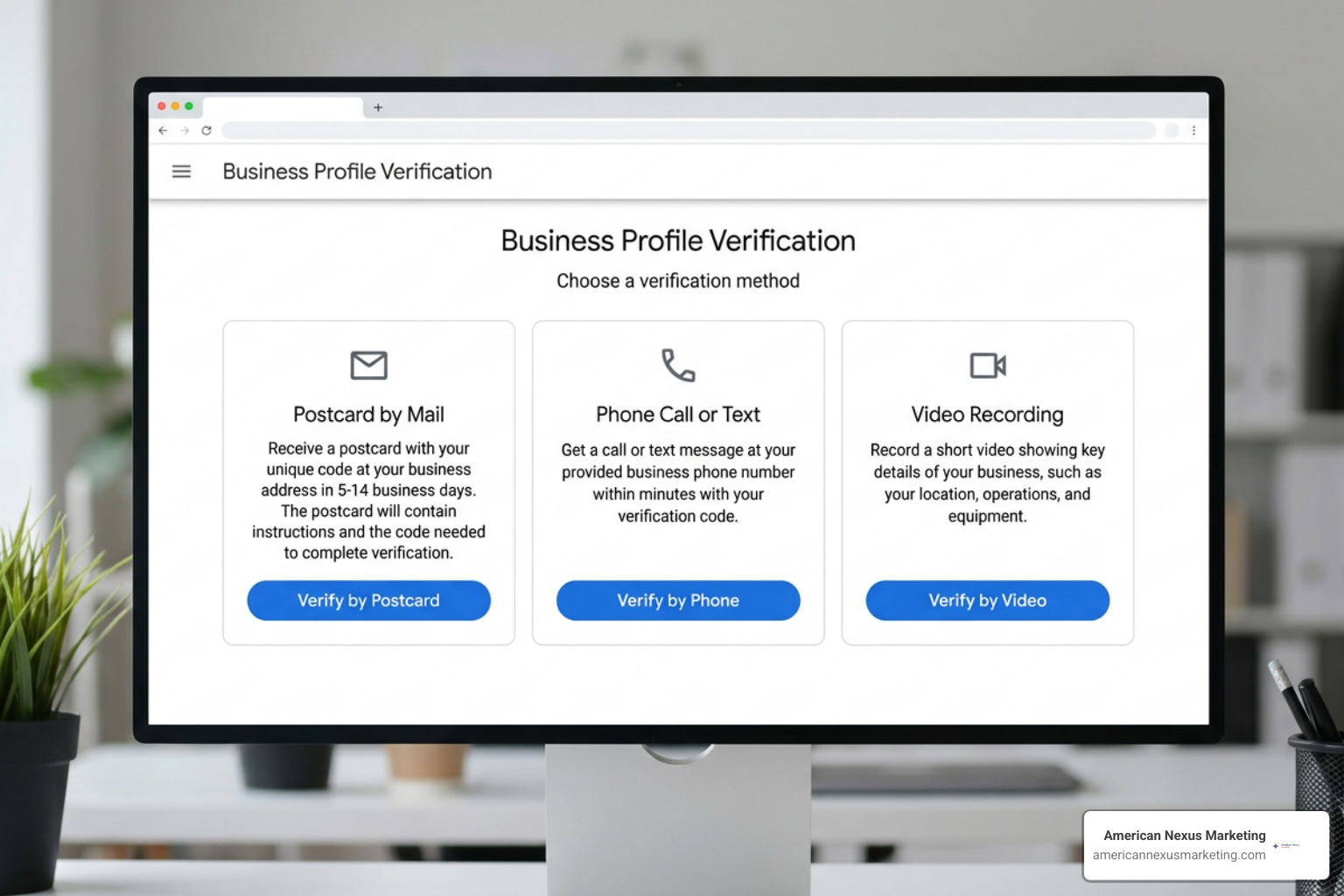
Once you have initiated your profile creation at business.google.com, Google will require you to verify your business to prove you are the actual owner. Google offers a few different verification methods depending on your business type and location:
- Postcard Verification: Google mails a physical postcard containing a unique verification code to your business address. This typically takes 5 to 14 days to arrive.
- Phone or SMS Verification: If eligible, you can receive a quick text message or automated phone call with your verification code.
- Email Verification: A simple code sent directly to your official business email address.
- Video Verification: A newer method where you record a continuous video showing your business location, street signs, nearby landmarks, and proof of operations (like unlocking the front door or showing your business license).
Step-by-Step Google Local Listing Optimization for New Profiles
Once verified, it is time to build your profile’s core structure. To make this process painless, we recommend checking out our introductory guide, Google Company Profile 101: put your business on the digital map.
Here is the exact order of operations to nail your core business information:
- Enter Your Legal Business Name: Use your real, legal business name exactly as it appears on your physical storefront signage and official business registration. Do not add extra keywords (e.g., writing “Joe’s Plumbing – Best Seattle Plumber” instead of just “Joe’s Plumbing”). This is a direct violation of Google’s guidelines and a fast track to profile suspension.
- Set Precise Operating Hours: List your exact business hours. If you close for lunch, make sure that is reflected.
- Add Holiday and Special Hours: Google rewards active profiles that keep their hours updated. If you are closed on Thanksgiving or have shorter hours on the Fourth of July, update these ahead of time so customers do not show up to a locked door.
Selecting Primary and Secondary Categories
Your primary category is arguably the single most important ranking factor on your profile. It tells Google’s algorithm exactly what your business is, not just what it sells.
If you are a dentist who also does teeth whitening, your primary category should be “Dentist,” and “Cosmetic Dentist” should be a secondary category. If you set your primary category to something too broad or irrelevant, you risk category dilution, which weakens your ranking power for your core services.
You can select one primary category and up to nine secondary categories. We recommend auditing your category choices annually because Google frequently updates its available categories to match shifting consumer search habits.
Writing Descriptions and Selecting Attributes
Your business description is your chance to pitch your brand directly to potential customers while feeding Google’s Natural Language Processing (NLP) models with rich, contextual information.
You have a 750-character limit to write your description, but only the first 250 characters are visible in search results before a user has to click “More.” Keep your most compelling value proposition and your primary local keywords near the very front of the text. For official, step-by-step instructions on writing these, you can consult the Google Business Profile Help: Add or edit your business description resource.
After writing your description, turn your attention to business attributes. These are small, searchable tags that highlight specific features of your business, such as:
- Accessibility: Wheelchair-accessible seating, restrooms, or parking.
- Amenities: Free Wi-Fi, gender-neutral restrooms, or kid-friendly spaces.
- Offerings: Curbside pickup, delivery, or virtual appointments.
For a deeper dive into structuring these elements to maximize your lead generation, read through the strategies outlined in this guide on how to fully optimize your Google Business Profile in 2026.
Maximizing Trust with Reviews, Media, and Engagement
Once your profile’s foundation is built, you need to bring it to life. Google is not a set-it-and-forget-it platform. It is a dynamic marketplace where active engagement directly translates to higher rankings and better conversion rates.
To turn passive searchers into paying customers, you need to focus heavily on the human elements of your profile: reviews, high-quality media, and timely updates. If you are looking to boost your overall website performance alongside your local listing, check out our guide on six simple ways to improve your site’s SEO ranking today.

Managing Positive and Negative Reviews
Reviews are the lifeblood of local search. Google bolds specific words and phrases within customer reviews that match a user’s search query, making them a powerful source of unstructured keyword data.
To build optimal local ranking momentum, we recommend aiming for at least 4.5+ stars and 50+ reviews within your first 12 months.
When it comes to responding to reviews, speed and professionalism are everything:
- Positive Reviews: Respond within 24 to 48 hours. Thank the customer by name, and gently mention the specific service they received (e.g., “Thanks for the review, Sarah! We loved helping you pick out your new indoor plants.”). This naturally adds relevant keywords to your profile without looking spammy.
- Negative Reviews: Never respond with anger, defensiveness, or excuses. Take a deep breath, write a calm and professional response, and invite them to resolve the issue offline. For businesses in highly regulated, high-trust fields like medicine or law, make sure your responses never violate privacy regulations (like HIPAA) by confirming or denying that the reviewer was a patient or client. Keep it strictly standard: “We take all client feedback seriously. Please reach out to our practice manager directly at your convenience so we can discuss your experience.”
Visual Content: Photos, Videos, and Google Posts
Adding visual content is one of the easiest ways to stand out from your competitors. Google’s data shows that photos increase click-through rates by 35%. Profiles that feature 50 or more high-quality, original photos consistently outperform those that look like a digital ghost town.
- Photos: Upload a mix of high-resolution exterior shots (to help people find your building), interior shots (to show your shop’s vibe), team photos, and close-ups of your products or completed work. Avoid generic stock photos or images cluttered with heavy text overlays—Google’s AI can recognize stock imagery and may filter it out.
- Videos: Keep videos under 30 seconds, under 100 MB, and filmed in high resolution (720p or higher). A quick walk-through of your office or a brief product demonstration works wonders.
- Google Posts: Think of Google Posts as your business’s micro-blog. Use them to share weekly updates, promote upcoming seasonal events, or highlight limited-time offers. Posts stay visible on your profile for seven days before being archived, so aim to post at least once a week to show Google and your customers that you are actively operating.
Seeding the Q&A Section
The Questions & Answers section of your Google Business Profile is a highly underutilized asset. Anyone on the internet can ask a question on your profile, and unfortunately, anyone can answer it—which can lead to incorrect information about your pricing, hours, or services being displayed.
To take control of this space, you can “seed” your own Q&A section. It is completely within Google’s guidelines to write your own frequently asked questions and answer them yourself using your official business account.
For example, you can write: “Q: Do you offer emergency plumbing services on weekends?” and answer with: “A: Yes, we provide 24/7 emergency plumbing services across the entire metro area. Call our emergency hotline at [Phone Number] for immediate help.” This builds pre-sale trust and answers common objections before a customer even contacts you.
Technical Local SEO: Citations, Schema, and Site Structure
While your Google Business Profile is the star of the show, it does not exist in a vacuum. Google constantly cross-references your profile’s data with your actual website and other directories across the web. If there is a mismatch, Google’s trust in your business drops, dragging your rankings down with it.
| Feature / Detail | Physical Storefront | Service-Area Business (SAB) |
|---|---|---|
| Physical Address | Must be displayed publicly on Google Maps | Hidden from public view; defined by service radius |
| Local Schema Focus | Precise latitude/longitude coordinates | Broad geographic service areas and city pages |
| Citation Style | Standard street address matching storefront | Hidden address with consistent city/state data |
| Fulfillment Options | In-store shopping, curbside pickup, walk-ins | On-site services, home delivery, mobile visits |
Auditing NAP Consistency and Citations
NAP stands for Name, Address, and Phone Number. For optimal local search authority, your NAP must be identical across every single corner of the internet.
Google’s crawlers treat even minor formatting differences as entirely separate entities. For example, if your business is listed as “123 Main Street, Suite 4” on Google, but your website footer says “123 Main St. #4” and your Yelp profile says “123 Main Street, Unit 4”, Google gets confused.
To prevent this, you should perform a thorough NAP audit. We have created a step-by-step checklist on how to audit your business NAP for better rankings to help you find and fix these hidden issues. If your online listings are a complete mess, it may be time to invest in a professional citation cleanup service to systematically align your digital presence.
Implementing LocalBusiness Structured Data
Structured data, also known as schema markup, is a specialized code you add to your website’s backend. It acts as a direct translator for search engines, telling Google’s crawlers exactly what your website content means in a structured, machine-readable format.
By implementing LocalBusiness JSON-LD schema on your website, you are hand-delivering your business name, address, phone number, operating hours, and social profiles directly to Google’s database.
To write this code correctly, we recommend following the technical specifications in the Local Business Structured Data Documentation. Here is a basic example of what this structured data looks like in JSON-LD format:
Storefronts vs. Service-Area Businesses (SABs)
The way you approach google local listing optimization depends heavily on whether customers visit your physical shop or if you travel to them.
- Physical Storefronts: If you operate a brick-and-mortar storefront (like a bakery, retail boutique, or hair salon), you must display your physical address publicly. Your main optimization goal is to drive foot traffic, secure physical direction requests, and showcase your in-store product inventory directly on your profile.
- Service-Area Businesses (SABs): If you work from home or operate a mobile business (like a plumber, carpet cleaner, or mobile pet groomer), you do not want random internet searchers showing up at your house. Google allows you to hide your physical address completely. Instead, you define your service area by entering specific zip codes, cities, or counties (up to a 2-hour driving radius). Your optimization strategy will focus heavily on building unique, high-quality city landing pages on your website to capture search traffic across your entire service territory.
The Future of Local Search: AI Overviews and Entity SEO
As we navigate through 2026, the local search landscape is undergoing its most massive evolution in a decade. Traditional keyword matching is taking a backseat to AI-driven, entity-based search. Google’s search algorithms no longer just look at the words on your page—they are trying to understand how your business connects to the broader real-world ecosystem.
Google’s AI models scan the entire web to verify if your digital representation matches real-world facts. They analyze local landmarks, neighborhood nicknames, and local slang to establish “Semantic Proximity” rather than just relying on pure physical distance. To keep up with these changes, you can monitor the latest algorithmic updates directly through the Google Business Profile Help Center.
Advanced Google Local Listing Optimization for AI Overviews
To make sure your business is recommended in Google’s AI Overviews (formerly known as Search Generative Experience), you must move beyond basic profile updates and embrace an entity-first optimization strategy.
- The Entity-Anchor Framework: Google’s AI relies on highly trusted, authoritative databases (like state licensing boards, professional registries, and major local directories) to verify your business’s legitimacy. Make sure your profile details perfectly mirror these official records.
- Semantic Proximity Audits: Incorporate hyper-local landmarks, neighboring districts, and regional terms into your business descriptions and Q&As. If your office is “just two blocks north of the historic Space Needle,” say so! This helps Google’s NLP models understand exactly where you sit in the local physical landscape.
- Structured Services Menu: Fill out every single item in your Services menu on your profile. Do not just list the service name; write a detailed, factual, 300-character description for each service. This structured data is highly readable for AI models searching for specific capabilities. For a deeper look at aligning your technical site structure with these guidelines, check out the Google Search Central: Local SEO Guidelines.
To master these advanced strategies and discover how Google’s entity graph is reshaping map rankings, read through the comprehensive breakdown on Google Business Profile Updates: Local | AuthoritySpecialist.com.
Frequently Asked Questions about Google Local Listing Optimization
How long does it take to see results from local listing optimization?
For most small businesses operating in moderately competitive local markets, you will typically start seeing noticeable ranking improvements within four to eight weeks of fully optimizing your profile.
However, local SEO is a compounding game. The real magic happens over three to six months as your steady stream of customer reviews, fresh photo uploads, and consistent local citations build a solid foundation of trust with Google’s algorithm.
Can I have a Google Business Profile if I work from home?
Yes, absolutely! If you run a home-based business or a mobile service-area business, you can safely create a Google Business Profile.
During the setup process, simply select the option to hide your physical address from the public. You will still need to enter your actual home address for Google’s verification purposes, but customers will only see the geographic service areas (cities, counties, or zip codes) that you choose to display.
What are the most common mistakes that lead to profile suspension?
Google has become incredibly strict with its local guidelines. The most common mistakes that will get your profile suspended include:
- Keyword Stuffing Your Business Name: Adding extra promotional keywords to your name field that do not match your legal business registration or physical signage.
- Using a Fake Address: Trying to claim a profile using a P.O. Box, a virtual office address, or a UPS Store mail drop.
- Creating Duplicate Listings: Setting up multiple profiles for the exact same business location in an attempt to crowd out competitors.
- Inconsistent NAP Data: Having wildly conflicting phone numbers or addresses listed across different high-authority directories.
To learn more about keeping your profile clean, compliant, and performing at its absolute best, check out the developer-focused playbook on Local SEO · llmbestpractices.
Conclusion
At the end of the day, google local listing optimization is not about trying to trick an algorithm or finding a temporary shortcut to the top of Google Maps. It is about building a highly accurate, incredibly detailed, and deeply trusted digital representation of your real-world business.
By claiming your profile, nailing your core business details, engaging with your customers through reviews, and keeping your digital footprint consistent across the web, you stop hiding from the people who need your services most.
Are you ready to take full control of your local search presence and dominate your neighborhood market in 2026? We have put together the ultimate step-by-step roadmap to help you get there. Download our free, jargon-free Local SEO Checklist for Small Businesses 2026 today, and let’s start putting your business on the map!